
Isle of Reveries Controls and HUD
Where jump lives, what Y/X/B/A do, and how to set a pad for copy-spawn.
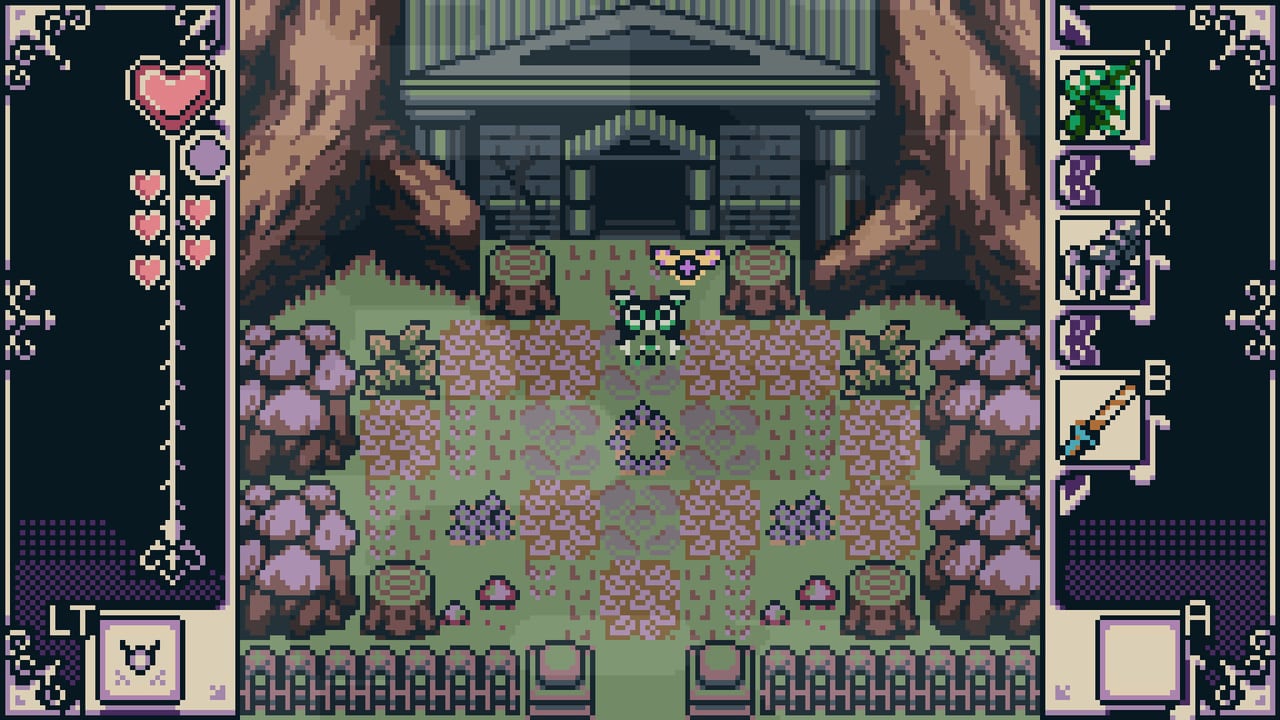
Isle of Reveries is built around a controller even when you launch it on a keyboard-friendly PC. Steam lists full controller support. desertcucco recommends a pad. January 2025 demo notes added Nintendo Switch Pro compatibility. Official screenshots show a HUD that only makes sense if face buttons are items and a shoulder is jump.
This page is the reference. Play advice sits in how to play.
What the HUD is telling you
From Steam screenshots:
- Left rail: a heart stack (current health) and a large heart icon. LB is labeled in the corner on some shots.
- Playfield: one Game Boy-sized room at a time.
- Right rail: four item windows tagged Y, X, B, and A in Xbox order, plus an empty A slot in early screens.
Those four windows are your loadout. They are not a pause-menu grid of twenty relics. If copy is not on one of them, you cannot copy. Assign the fairy the moment you get it in Pilgrim’s Sanctum.
Dedicated jump
Kickstarter: players jump freely with RT/RB so they are not swapping a feather in and out. That is the whole point of the control scheme. Put jump on a shoulder you can hold while your thumb stays on items. If you rebound jump to a face button, you will drop the lantern every time you hop a pit.
Keyboard users should bind jump to Space or a side mouse button and keep copy on a key that does not sit under movement. The game will forgive a pad better than a laptop keyboard on a park bench.
Move, push, lift
- Walk into a movable block to push it (demo update, January 2025).
- Lift is an equipped item (Power Glove in community timestamps), not the push action.
- Sword is an equipped item. Tap, do not hold for a mythical charged beam unless a later patch adds one.
- Lantern is use-on-the-spot. Face the thing you want lit.
Copy on a pad
Bind fairy copy to a face button you can hit while walking (X or Y for many people). Spawn is the same tool used a second time, or a contextual second press — play the demo once to feel the timing, then stop rebinding mid-dungeon. Fairy Slinger, when you have it, wants a slot of its own so you can fling without unequipping copy. See key items.
Two-player notes
The two co-op stages want two pads. Remote Play Together sends the host’s session to a friend; both still need a controller layout that matches this HUD. Read co-op before you rearrange buttons in Steam’s overlay.
Consoles
Switch, PlayStation, and Xbox versions launch on the same September 4, 2026 date. Expect the same four-slot idea mapped to each face diamond. If Electric Airship ships a gyro or touch option, it will be extra, not a replacement for the dedicated jump. Until those manuals exist, use this page plus in-game prompts.
If inputs feel eaten during Fermata, you are mashing. The 2025 notes patched boss spam. Tap sword in the window, jump the rest.
Frequently Asked Questions
Quick answers for pilgrims heading to the isle.
What button is jump in Isle of Reveries?
A dedicated shoulder control (RT/RB in the developer's write-up). It is not an item slot.
How many items can I equip?
Screenshots show four face-button slots plus jump on a shoulder. Assign copy as soon as the fairy joins.
Can I play on keyboard?
Yes, but a controller is recommended. Bind jump off the item keys.
How do I push blocks?
Walk into them. Lifting is a separate equipped tool.